
Credit balance
The customer's wallet — where credit comes from, how it is spent, and why every movement is recorded.
What it is
Credit balance is money a customer has stored with you. They can spend it on a future order, just like cash. It's separate from loyalty points — points are earned, credit is spent. See Loyalty points for how points turn into credit in the first place.
How it works
Where credit comes from
Every change to a customer's credit balance falls into one of five types, and each one is recorded on its own:
| Movement | Direction | When it happens |
|---|---|---|
| Opening | in | A starting balance is recorded for an existing customer |
| Convert | in | The customer turns loyalty points into credit |
| Refund | in | A refund is returned as credit rather than money |
| Spend | out | The customer pays for an order with credit |
| Adjustment | either | A manual correction, with a note explaining it |
Adjustment is the only movement that can go either way, and it's also the only one where someone has to type in a reason. Every other type happens automatically, because of something the customer did.
There is currently no button anywhere in the app that lets someone record an Adjustment. This feature is fully built behind the scenes — it supports a plus or minus amount, a required note, and the same safety checks as every other movement — but nothing on screen can trigger it. An older screen used to let someone type in a new balance directly, but that was removed on purpose, because it let a balance change with no record of why. Today, the only way to manually correct a balance is for someone with direct access to the system's database to do it — there is no screen in the app for it.
Every movement is recorded
A customer's credit balance is not just one number that gets changed directly. It's a running history of every movement, and the balance is simply the total of that history.
A customer converts points, gets a refund, spends credit, or someone makes a manual correction.
A new line is added showing the date, the customer, what kind of movement it was, how much money moved, and the balance right after.
The customer's balance is the sum of everything that came before.
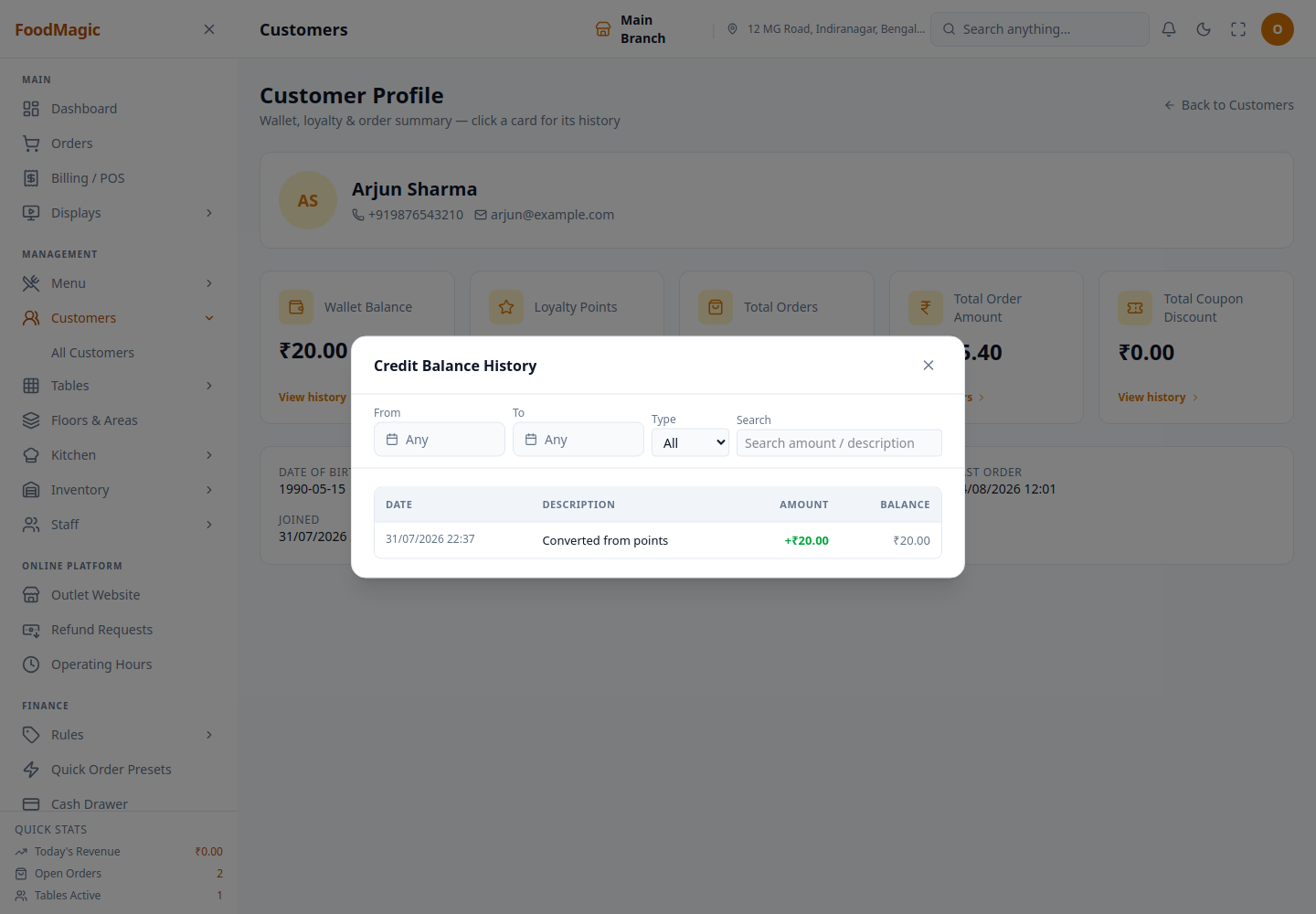
Because the full history is kept and never overwritten, you can always answer the question "why is this customer's balance ₹200?" Every rupee can be traced back to the order, refund, or correction that created it. Every movement also goes through the same safety check: the balance can never go below zero, and it can never drift out of line with its own history.
Spending credit
Credit can be applied at the till or at online checkout, but only against a customer who is attached to the order. If no customer is attached, there's no credit to spend, because there's no wallet to spend it from.
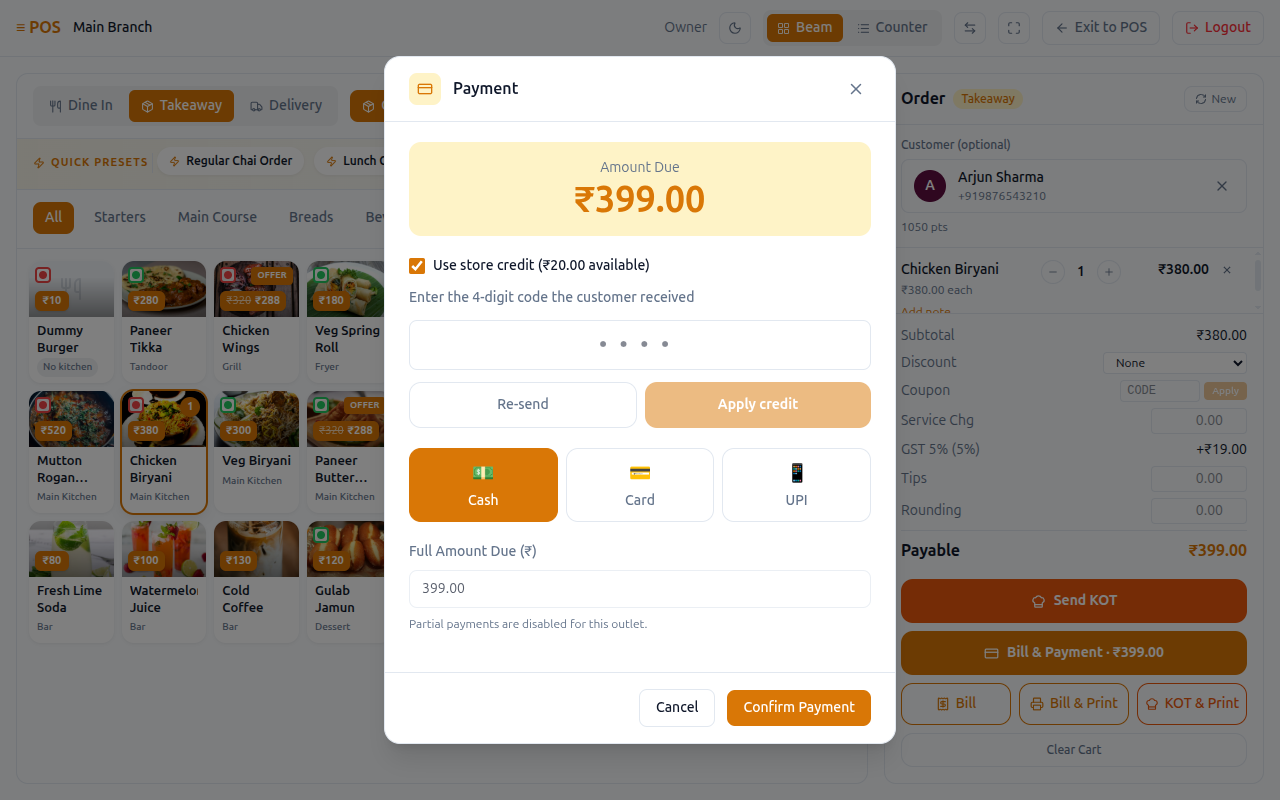
Redeeming credit at the till — a customer-confirmed code
Store credit isn't just typed in and deducted at the till. Using it on a bill needs the customer's own confirmation, not just staff approval.
On the Bill & Payment panel in Billing/POS, a checkbox appears whenever the attached customer has credit available. This checkbox is disabled if the customer has no verified phone number or email, because there's nowhere to send a code.
A one-time code is generated for that amount.
Unless the brand has turned on display mode (see below), the code is sent only to the customer and is never shown on the till screen.
The code is checked, and once it matches, a store-credit payment is recorded against the order. If the code doesn't arrive, a Re-send button starts the process again from step 2.
A setting in Brand Settings → Loyalty & Store Credit controls how the code is delivered. Normally the code is kept off the till screen, and the customer reads it out to staff themselves — this is called input mode. A brand can instead choose display mode, where the code is shown right on the till screen for staff to read out to the customer. Display mode is more convenient but less secure, and it's a trade-off each brand chooses for itself.
Use this whenever a customer wants to pay part or all of a bill from their wallet instead of cash or card. The confirmation code exists so a customer's balance can never be spent without them being there to approve it. Both waiters and outlet managers can process a redemption at the till. The system also refuses to redeem credit against an order from a different outlet than the one the staff member is signed into, even if that staff member is normally allowed to redeem credit.
Refunds: money, credit, or points
When an order is refunded, there are three ways to return the value, and the choice is a deliberate one:
| Returned as | Effect |
|---|---|
| Money | Leaves the business |
| Credit balance | Stays with you, spendable on a future order |
| Loyalty points | Stays with you, and must be converted before use |
Refunding to credit or points keeps the money inside the business, but it is still the customer's money. Which option you offer is a business decision, not something the system decides for you.
Where to see it
| Screen | Shows |
|---|---|
Customers (/customers) |
Credit balance per customer, and the brand-wide total |
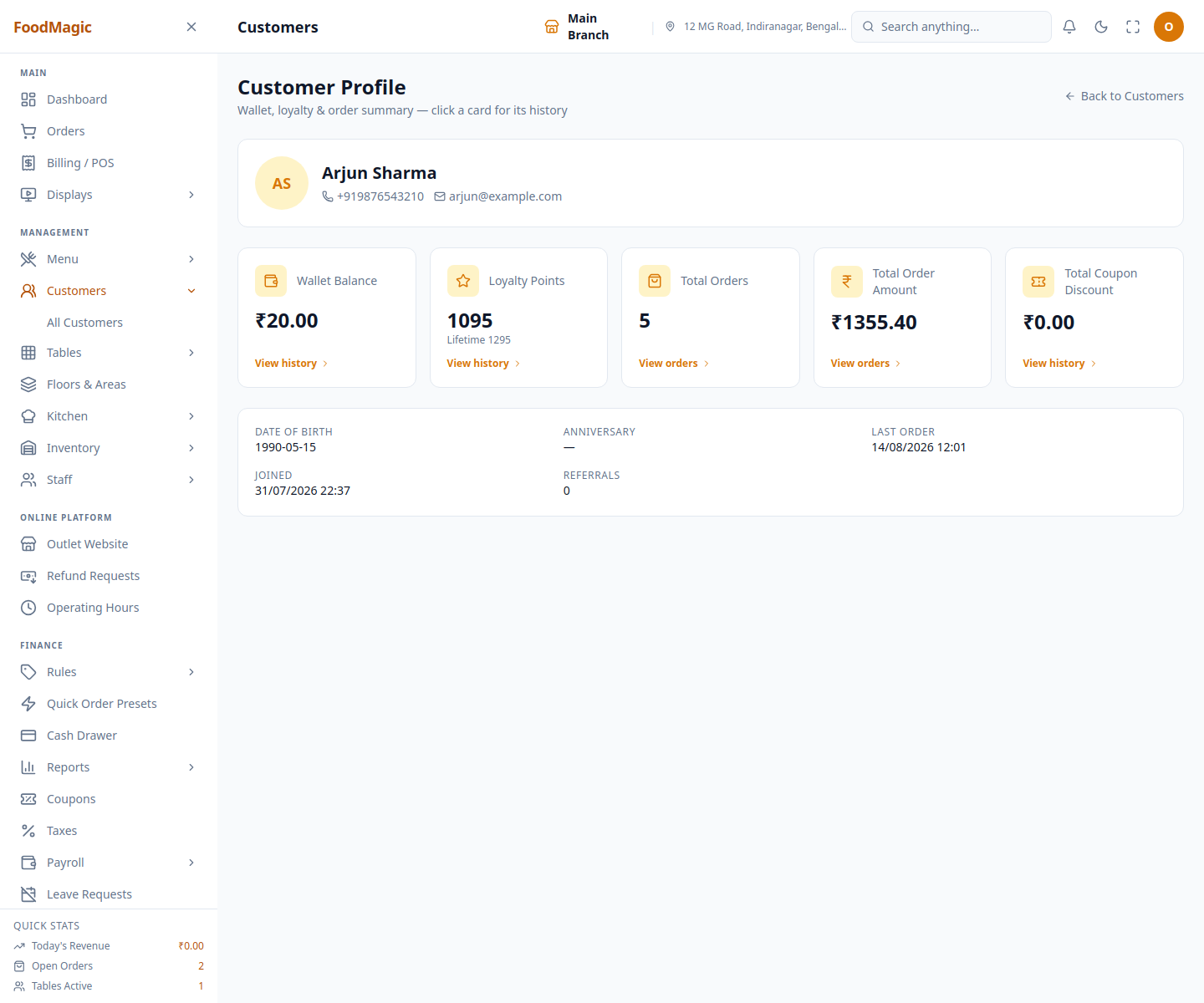
| Wallet Balance tile on the Customer Profile | Opens the Credit Balance History drawer for that one customer — see Customer records |
| Credit Balance Report | Every movement — date, customer, kind, earned, redeemed, balance afterwards. Filterable by kind and by whether it came from the till or the website |
| Front website account | The customer's own wallet history |
The Credit Balance Report separates credit in from credit out and shows the total still available. If that available total keeps rising, it means you are holding more and more customer money — that's a debt you owe them, not income for the business.
How it is secured
Redeeming store credit at the till uses the same permission as till operations more generally. Out of the box, both the Waiter role and the Outlet Superadmin role can do this. The brand super-admin role does not get this ability automatically — it's treated as a till task for the people running service day to day, not a head-office task. An admin can turn this on or off for any role from the Roles & Permissions screen.
Credit belongs to the customer, and the customer belongs to the whole brand, not to any one outlet. That means the same balance can be spent at any branch. There's one deliberate exception: staff can only redeem credit against an order placed at their own outlet. A staff member signed into one branch cannot process a credit redemption for an order at a different branch, even though the wallet itself is shared across the whole brand. Roles that aren't tied to a single outlet aren't affected by this restriction.
The confirmation code sent to the customer expires, and only allows a limited number of tries — each brand sets this limit from Brand Settings → Loyalty & Store Credit. After too many wrong attempts, that code stops working, and staff have to send a new one. This stops someone from guessing a 4-digit code by trying repeatedly.
A redemption amount must be a positive number, and it can never be more than what the customer actually has in their wallet. Every credit movement, of any kind, is blocked outright if it would push the balance below zero. There are no exceptions.
Because every movement is written as its own permanent line in the customer's credit history (see "Every movement is recorded" above), that history itself works as the audit trail. There's no separate log to check, and no movement can ever be edited or deleted afterward — only added to.
Known weaknesses.
There is no screen for a manual Adjustment — see the warning under "Where credit comes from" above. If you ever need to manually correct a customer's balance (for a goodwill credit, or to fix an old data-entry mistake), there is currently no way to do it from within the app.
Referral rewards are never automatically paid out as credit — see Customer records → How it works → Referrals. If you want referral rewards to land in a customer's wallet, that connection doesn't exist yet, and trying to do it manually would run into the same missing-Adjustment gap described above.
Who can see a customer's credit balance follows the same brand-wide (not outlet-specific) access described on Customer records → Known weaknesses — anyone who can view the customer list can see every customer's wallet balance across the whole brand, no matter which outlet they work at.
Related pages
The list, labels, and the customer profile's stat tiles.
Earning points, and converting them into credit.
- Orders — refunds and store-credit spend both happen in the context of an order.